High Converting Keywords Live in Your Buyers' Words, Not Your Keyword Tool

High converting keywords come from buyer language and your own Search Console data, not tool exports. The exact method, with sourced numbers.
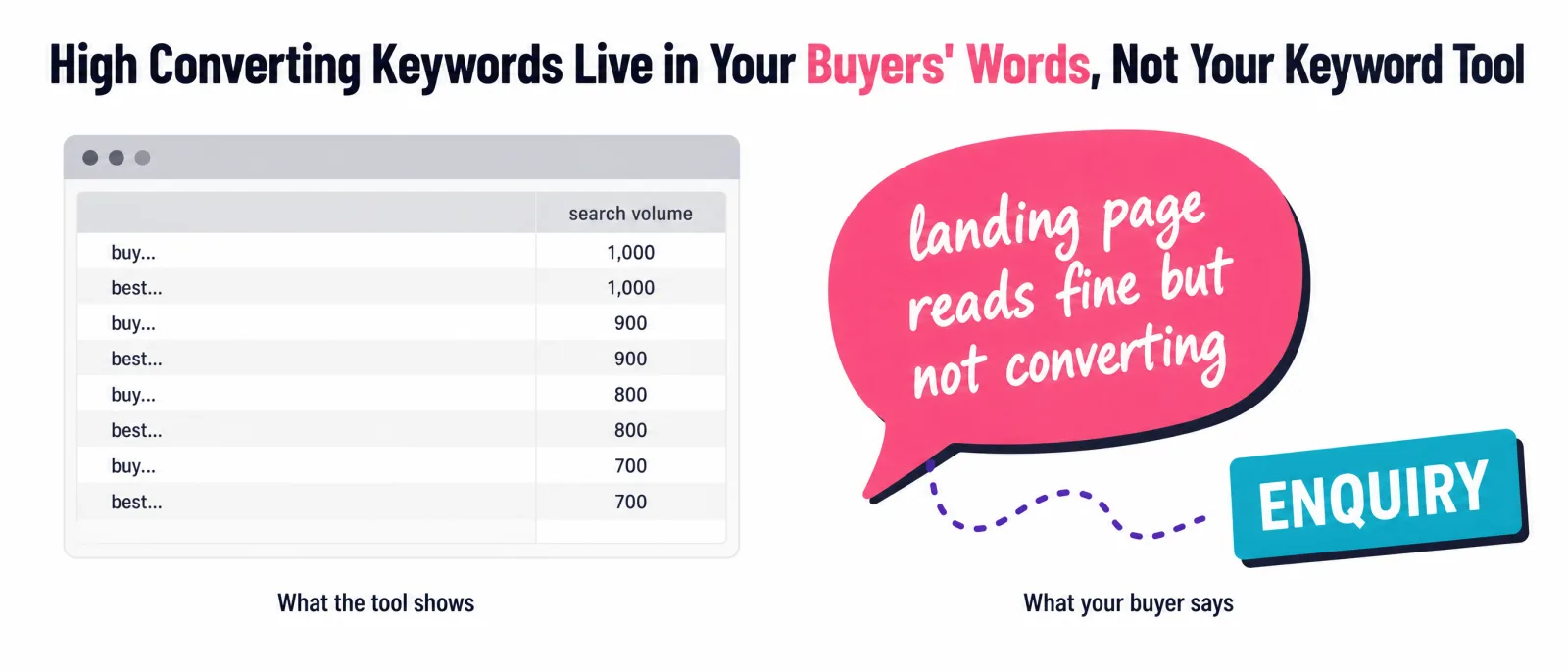
I keep having the same call.
A founder or a marketer shows me their traffic screenshot. Rankings up, clicks up, the graph does the nice thing. Then they say some version of the sentence I've heard so many times I could set my watch by it: "the website gets traffic but no sales."
I used to give the standard answer myself. Open a keyword research tool, export the list, filter for the commercial ones, target "buy" and "best" and "pricing". That's keyword research as most guides teach it. I've read that article. You've read that article. You've probably read it nine times under nine different logos, and if it worked, you wouldn't be here.
Here's what changed my mind: I've been running websites since the 2000s, I lost a six-figure content site to a Google spam penalty in 2012, and these days I publish data-led autopsies like the Justin Welsh case study, where a site grew organic traffic about 480 times and then lost roughly 94% of it in six months. After enough of those investigations, a pattern gets hard to unsee. The keywords that produce customers almost never come out of a keyword tool. They come out of buyers' mouths. That observation is the whole method behind Sherlock, our Customer DNA report, and I'll give you the method for free before I say another word about the product.
TL;DR
- A high converting keyword is a search term whose visitors become your customers at an above-average rate. For B2B organic search, the average is 2.6% (First Page Sage, updated December 2025). "High intent" is a generic label; high converting is specific to your buyer.
- The source that pays isn't a tool. It's your buyers' own words: reviews, sales calls, support threads. Buyers type what they say. Sherlock, the Customer DNA report, extracts that language as a product.
- Your free confirmation engine is Google Search Console joined with GA4 by landing page: GSC shows the query, GA4 shows the money.
- Volume thresholds hide the winners: 92% of all keywords get 10 or fewer searches a month (Ahrefs data, via Embryo). The converting tail is invisible in tools and visible in your own data.
What Are High Converting Keywords, Really?
A high converting keyword is one your buyers type right before they pay, not one a tool labels commercial.
That distinction sounds small. It's the whole game. Most guides define high-converting keywords as "keywords with high commercial intent", then hand you the same modifier list everyone else has. Search intent taxonomies are real (informational keywords, commercial keywords, and the rest), and the user intent lens is useful. But intent labels describe the average searcher across the entire internet. Conversion happens between one specific buyer and one specific page. A term can be flagged "transactional" by every tool on the market and still convert nothing for you, because the people typing it aren't your people.
For calibration: First Page Sage's conversion benchmarks, updated December 2025, put B2B organic search at a 2.6% conversion rate, ahead of email (2.4%) and roughly triple paid social (0.9%) (First Page Sage). A high converting keyword, for you, is one that beats your own baseline, whatever that is. Which already tells you something: you can't identify one from a search volume column. You need conversion data, and the only conversion data that exists about your business is yours. The most valuable keywords on your site are the ones that drive enquiries and sales, whatever their search volume, and no keyword research tool has that column.
Before you can call any keyword high converting, you need your own baseline, and most people skip this. Take your last 90 days: conversions divided by organic sessions. That single number, however unglamorous, turns "this keyword feels good" into "this keyword converts at 4% against our 1.8% baseline". Without it, every keyword decision is a vibe. With it, a term with 30 searches a month can prove itself in a fortnight.
I made this mistake for years with funnel labels too, and wrote up what fixed it in the bottom of funnel keywords guide. Here's the difference in one table:
| Keyword | What the label tells you | What it hides | Who it converts for |
|---|---|---|---|
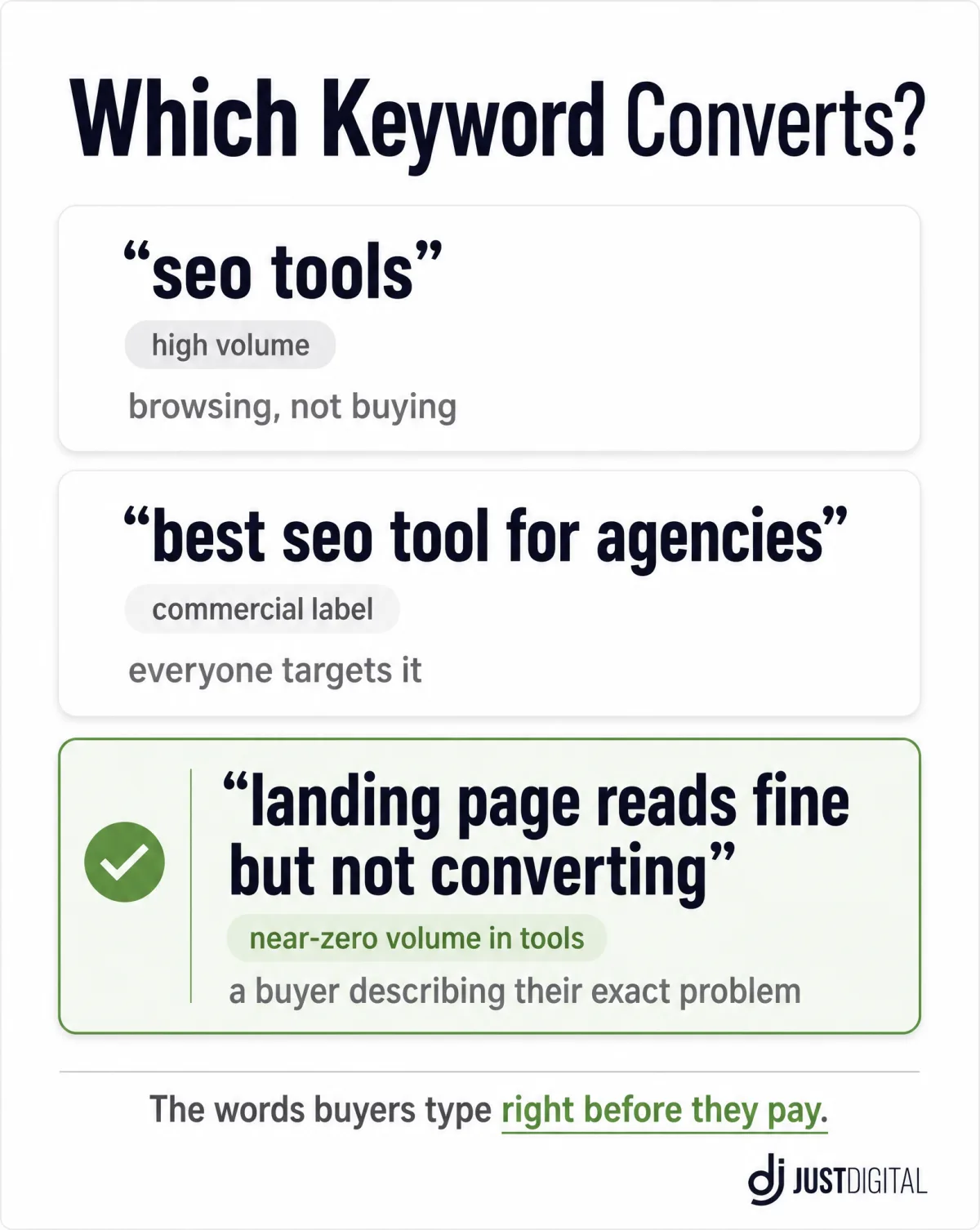
| "seo tools" | High volume, informational | Searcher is browsing, not buying | Almost nobody, reliably |
| "best seo tool for agencies" | Commercial intent, modifier present | Every agency on earth targets it; the searcher is comparison shopping everyone | Whoever wins a brutal SERP, at average rates |
| "landing page reads fine but not converting" | Near-zero volume in tools | Nothing. This is a buyer describing their exact problem | The one business whose page answers that sentence |
Why Don't High Intent Keyword Lists Convert for You?
Because everyone has the same list, and it was never about you.
Keyword tools draw from the same suggestion pools (many of them leaning on Google Keyword Planner data), so when a guide says "filter for buy, best, pricing, near me", it's handing you the same export your competitors downloaded the same week. Even Keyword Planner itself reports search volume and pay-per-click competition, not conversions. Modifier lists tell you what converts on average for everyone, which is another way of saying nothing about you. The modifier signals buying intent; the assumption that it transfers to your buyer is the part that fails. The same goes for chasing the keywords your competitors rank for: competitor keywords tell you where they fish, not where your buyers bite.
Intent does have a market price, and it's worth knowing what it is. WordStream's 2026 Google Ads benchmarks, built on 13,474 US search campaigns, put the average cost per click at $5.42, and up to $9.87 in legal (WordStream). That's what advertisers pay, per visitor, for commercial-intent clicks. When you find a converting keyword organically, you're capturing a click the market prices at five to ten dollars, for free, repeatedly. And when you do pay for clicks, the words matter twice: message testing with buyer words cut one client's cost per conversion by 49.3% in the same ad auction.
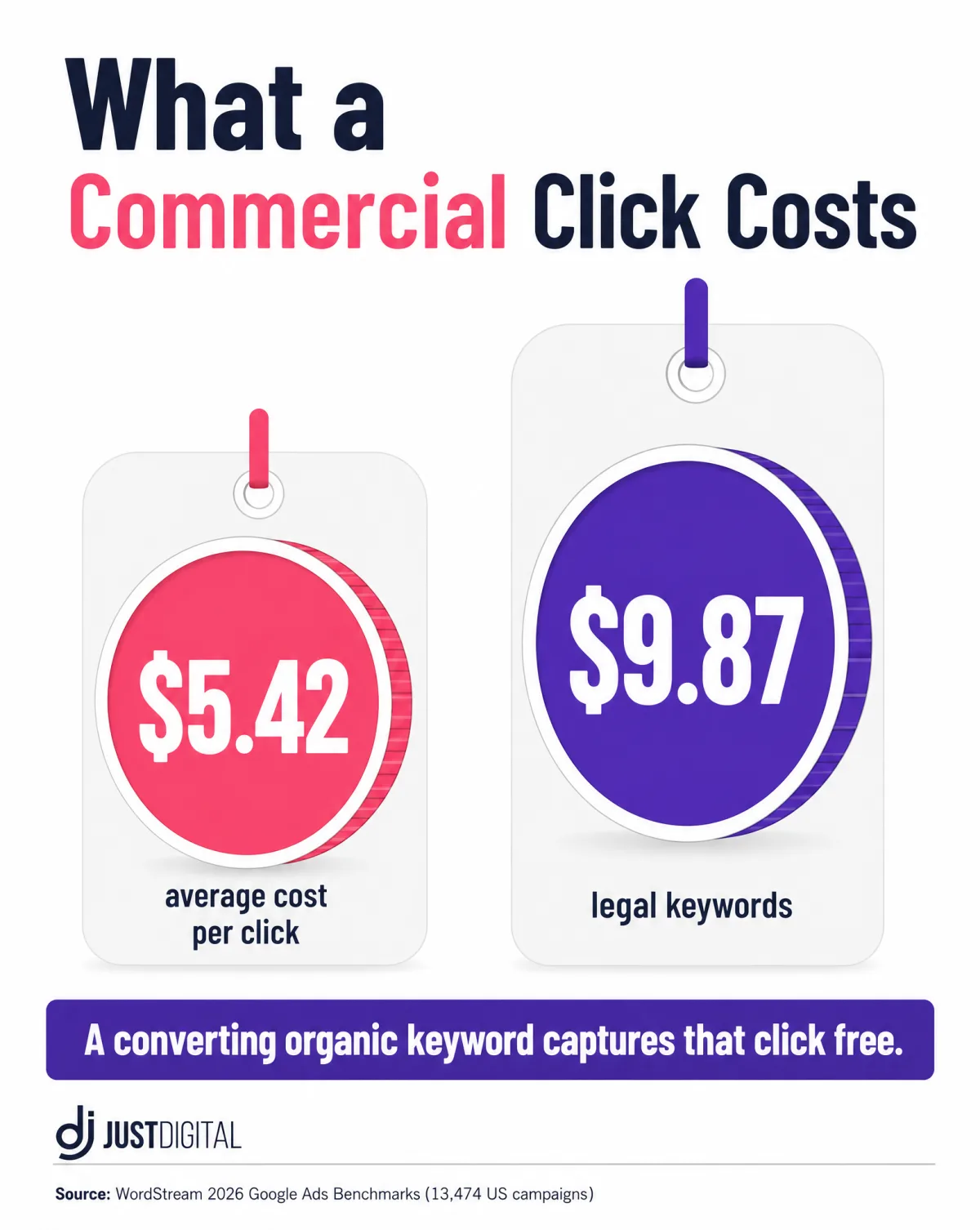
But here's the failure mode I see on real sites: you target the generic high-intent term, you even rank for it, and the traffic bounces. Now you've spent months learning nothing except that a label isn't a buyer. Worse, the lesson usually gets misread. The team concludes "SEO doesn't convert for us" and shifts budget to ads, where the same generic targeting fails at $5.42 a click instead of failing free.
The tell is in the queries themselves. When a generic term converts, there's almost always a specific phrasing underneath doing the work: not "crm software" but "crm that works with a shared inbox". The generic term gets the credit in the report; the specific sentence earned the sale. The fix isn't a better modifier. It's a better source.
Want case studies like this in your inbox? They go out when there's evidence worth sharing, not on a content calendar:
Where Do High Converting Keywords Actually Come From? Your Buyers' Words
The words buyers say right before they pay are the highest-converting keywords available to you, and they're already lying around your business.
Buyers type what they say. When someone tells you on a call "we changed our entire website the next day", or writes in a review "I was shocked how accurate this was", they are speaking the language they also search in. The queries that convert carry the buyer's specific situation: the objection, the deadline, the thing they tried that failed. A page that answers in the same words wins, because the searcher recognises themselves in the first line.
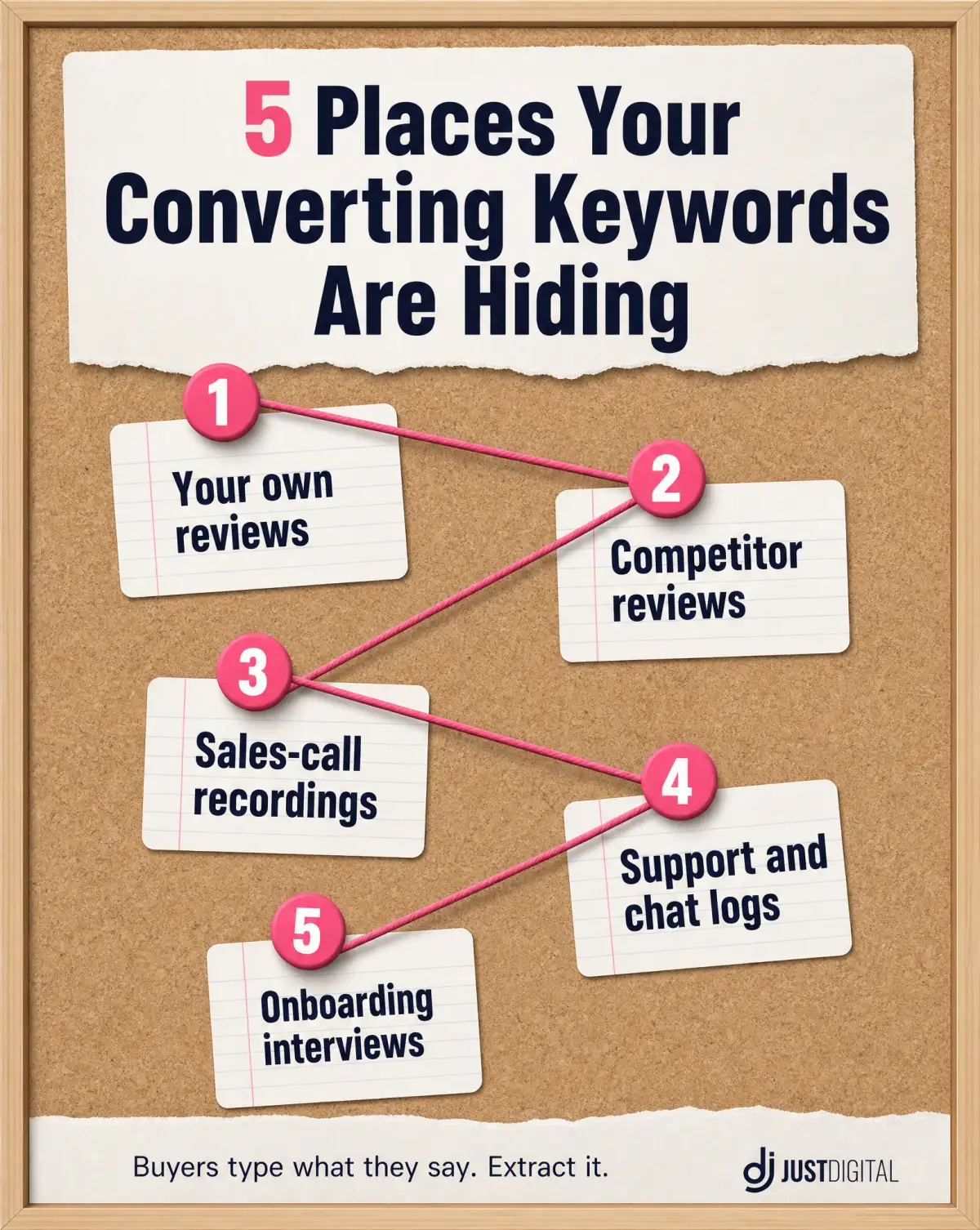
Your next converting keyword is already in a sentence a buyer said to you. You dig it out rather than dream it up. Five places to dig:
- Your own reviews. Buyers describe the before-state in them: "we had traffic but nothing converted."
- Competitor reviews. Their unhappy customers write your keyword list: what they wanted and didn't get.
- Sales-call recordings. The first two minutes, where the buyer explains the problem in their own words.
- Support and chat logs. Pre-purchase questions are queries with a name attached.
- Onboarding interviews. "What made you buy?" answered in the buyer's phrasing, on the record.
Here's what the extraction looks like in miniature. A review says: "we'd rebuilt the homepage twice and it still wasn't bringing enquiries." Underline the buyer's own nouns and verbs, and you have the query family: "homepage not bringing enquiries", "rebuilt website still not converting". Make the strongest phrasing your H1, answer it in the first paragraph, and you've built a page for a keyword no tool will ever show you, aimed at the one person who's ready to fix the problem. That's most of the method. The catch is that it doesn't scale by hand very fast.
This isn't just my observation. Nielsen Norman Group's second usability heuristic, updated January 2024, says the design should "speak the users' language", using words familiar to the user "rather than internal jargon", and their research finds that visitors who don't recognise the words often simply go elsewhere (Nielsen Norman Group). Language match isn't a copywriting nicety. It determines whether the visitor stays long enough to convert.
You can do this extraction manually with the five sources above. It takes hours per niche, which is exactly why we productised it. Sherlock, our Customer DNA report, builds the psychological profile of your real buyers from their own words: a Buyer Psychology Map of their dreams, objections, fears and frustrations, and an Exact Buyer Language section with phrases ready to paste into pages, ads and emails.
How Do You Find High Converting Keywords in Search Console?
Search Console is the only keyword tool that shows queries your site already converts on, and it's free. To find high-converting keywords in your own data, you need two reports joined: keyword performance from Search Console and conversions from GA4.
Google's own documentation describes the Performance report as the place to "learn which queries are bringing traffic to your site", with clicks, impressions, CTR and average position for every query (Google Search Console Help). What the docs undersell is what happens when you join it with GA4: GSC shows the query, GA4 shows the money, and the landing page is the key that connects them.
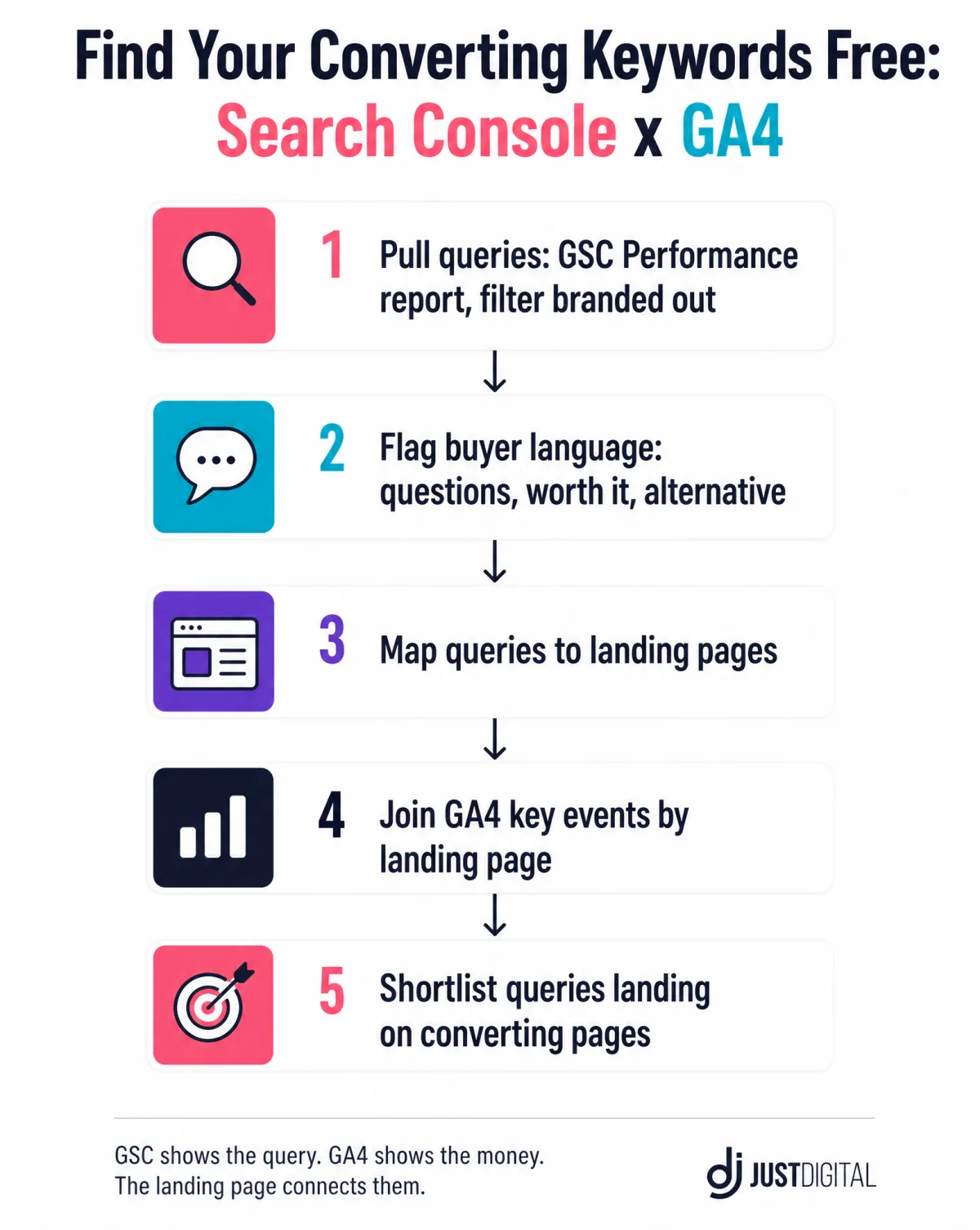
Here's exactly what I do, step by step:
| Step | Where | What you're looking for | Output |
|---|---|---|---|
| 1. Pull queries | GSC Performance report, 3-6 months | Every query with impressions, branded terms filtered out | Raw query list |
| 2. Flag buyer language | The query list | Questions, objections, comparisons: "cost", "worth it", "not working", "alternative" | Shortlist of intent-carrying queries |
| 3. Map to landing pages | GSC Pages tab | Which page each shortlisted query lands on | Query-to-page map |
| 4. Join the money | GA4 key events by landing page | Pages where conversions actually happen | Conversion-per-page truth |
| 5. Cross-reference | Both | Queries landing on converting pages, and converting pages with no query owner | Your converting-keyword list, plus your next keyword opportunities |
Two caveats so the data doesn't lie to you. Search Console hides very-low-frequency queries for privacy, so your rarest converting phrasings may show impressions without the full query string; that's normal, and it's another reason the buyer-language mining comes first. And GA4 attributes a key event to the session's landing page, not to the query, so the join gives you "queries that land on money pages", which is strong evidence rather than courtroom proof. Treat it as a shortlist generator.
Two habits make this work. Filter your branded queries out first, because they flatter every number they touch. And read the queries as sentences, not strings: "search optimisation tips" and "why is my page not converting" are different humans in different moments, and only one of them is near a wallet. I keep a working list of the implementation details in the search optimisation tips guide.
If your site is small, this still works, just slower. Forty clicks a month can surface one converting query, and one converting query is a page brief. Mine the buyer language first (previous section), publish pages in those words, and let Search Console confirm demand over the following weeks. Small data delays the confirmation without blocking the method.
Do Low Volume Keywords Convert?
Yes, and the data says the tail is most of the ocean: 92% of all keywords get 10 or fewer searches a month (Ahrefs data, cited in Embryo's long-tail statistics roundup), and over 70% of all search queries are long-tail terms (Embryo).
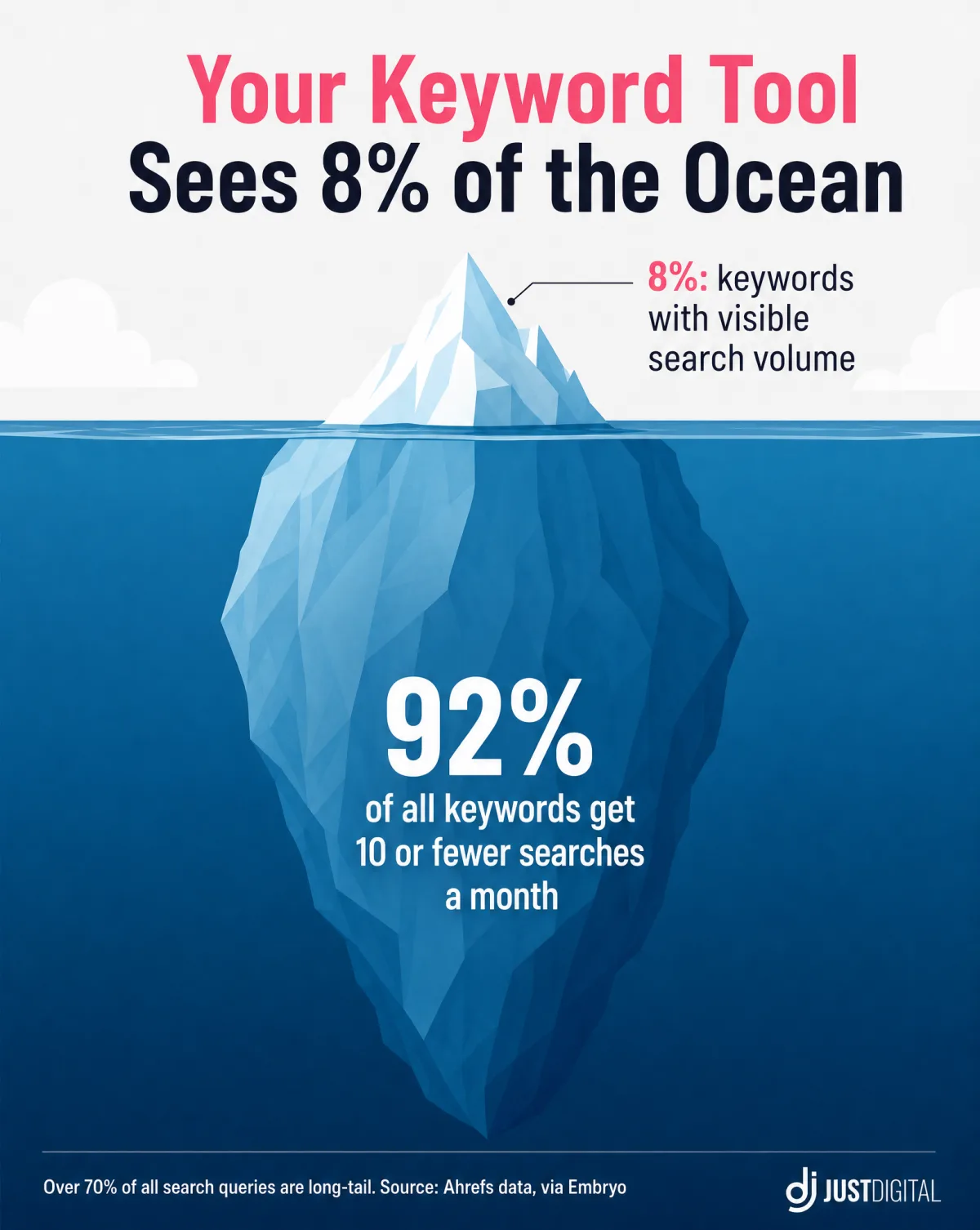
Sit with that number. If you only target keywords with visible search volume, you're fishing in the 8% of the ocean where every boat is. A long-tail keyword with a handful of searches and the right buyer behind it can beat a head term with thousands of browsers. The queries your buyers type, in their own phrasing, mostly live below the volume threshold your tool displays, which is why they look like they don't exist. They do; your Search Console sees them even where the tool goes blind.
I watched a version of this on our own site: the queries that eventually produced enquiries around the BOFU guide were phrasings no tool had assigned volume to. And there's a quality signal hiding in the format data too: across 160+ websites tracked by First Page Sage, annual industry reports convert at 4.8%, roughly double a standard blog article's 2.3% (First Page Sage). Higher conversion rates came from depth, not from bigger search volume. Depth on a precise term beats breadth on a big one, in the only column that pays.
The working loop for zero-volume terms is short: publish the page for the buyer phrasing, wait two to four weeks, then check Search Console for impressions you couldn't see before the page existed. The tools can only report demand that already has a ranking page to click; your page creates the measurement instrument. I've watched "invisible" queries turn into steady impressions within a month of the page going live, which is the quiet proof the demand was there all along.
The obstacle here usually isn't evidence. It's politics. A keyword strategy built on the right keywords looks unimpressive on a slide, because a 30-search term sits next to somebody's 5,000, and most SEO strategies are judged by the big number. If you need the counterexample for that meeting, it's the Justin Welsh autopsy: about 480x organic growth, then roughly 94% gone in six months. Volume chased without owned demand can vanish in one core update. A small keyword that pays rent is worth a stack of big ones that don't.
What Do You Do With a Converting Keyword Once You Find It?
You write the page in the buyer's words, and you stop treating "traffic but no sales" as a mystery, because it's a diagnosable condition.
Finding the term is half the job. Google's people-first guidance is explicit about the other half: content made "primarily... to attract search engine visits" is "not aligned with what our systems seek to reward" (Google Search Central). The page has to answer the human who typed the query, in the words they typed it. In practice:
- One page per converting term. Don't make one page carry five buying moments.
- The H1 mirrors the query. The searcher should recognise their sentence in your first line.
- Answer the pre-purchase questions on the page. Every unanswered question is a tab opened on someone else's site.
- One CTA per section. Never more. A page that asks for three things gets none.
- Every claim carries a source. Your buyers have been burned before; sourced claims are how you earn back the benefit of the doubt.
And when a converting keyword lands traffic on a page that doesn't sell, the page is the leak, not the keyword. That case is diagnosable. Watson, our $9 one-time copy diagnostic, investigates the page the way a buyer's brain reads it: scores seven buying triggers (Attention, Trust, Clarity, Urgency, Proof, Risk, Action), ranks the leaks costing you sales, and names the first fix. Report in about ten minutes.
One more habit that pays: keep the buyer's phrasing intact all the way to the page. If the sentence was "seo that actually brings customers", don't sand it down to "results-driven SEO services" in the headline. The polish removes the fingerprint, and the fingerprint is what the searcher recognises. I've seen more conversion lift from restoring a buyer's original sentence than from any layout change, which is why every rewrite at our studio starts from the transcript, not the thesaurus.
Which Tool Actually Finds Converting Keywords for You?
For the extraction itself, the answer is: the one that starts from your buyers instead of a keyword database.
Sherlock, the Customer DNA report, is ours. You fill in an intake form (about 15 minutes), and the report comes back within 5 business days with seven sections: a Buyer Psychology Map (dreams, objections, fears, frustrations), Exact Buyer Language ready to paste, your buyers' three conversion moments, word-for-word objection responses, competitive context (what buyers tried before you and why it failed), a priority matrix ranked by what moves the needle fastest, and channel-specific actions for your website, email, LinkedIn and ads. It carries a 30-day money-back guarantee; current pricing is on getsherlock.io.
Watson is the entry step: $9, one time, no subscription. It scores your page's seven buying triggers and ranks the leaks, and the $9 includes one full run of every other detective in the agency: Sherlock, Moriarty, Virtual Dom, and the Google Quality Rater. The guarantee as worded on the site: run all 5 tools once each, and if you don't find a single thing worth changing in your marketing, reply to your receipt and get the $9 back.
Lestrade, the intake interviewer, stays free and unlimited. If you want to feel the method before spending anything, start there.
| Offering | What it gives you for converting keywords | Terms |
|---|---|---|
| Sherlock (Customer DNA report) | Your buyers' exact language, objections, and conversion moments, extracted and organised | Pricing on getsherlock.io; 30-day money-back guarantee |
| Watson (copy diagnostic) | Finds the leak when converting-keyword traffic lands and doesn't convert | $9 one-time, includes one run of each other detective |
| Lestrade (intake interviewer) | The free way to start articulating your buyer's language | Free, unlimited |
| DomMCP (the tools inside Claude) | The same detectives as MCP tools in your own Claude | See DomMCP |
What these do NOT do, so you're buying with open eyes: no search volumes, no rank tracking, no keyword database. Sherlock hands you the exact phrases your buyers already use; Watson tells you why a page leaks. Your Search Console supplies the confirmation, and it does that part free. If you're assembling the rest of the stack, the conversion rate optimization tools guide covers what's worth paying for.
Ready to Hear Your Buyers Say It Themselves? Start With Sherlock
Frequently Asked Questions
The questions below are the ones Google's People Also Ask box shows for this query, answered straight.
What are high-intent keywords?
High-intent keywords are search terms whose wording signals buying intent: modifiers like "buy", "pricing", "vs" and "near me". Some tools sell the same idea as buyer intent keywords. They're a useful generic label, but they describe the average searcher, not your buyer. A high converting keyword is proven by your own conversion data and buyer language, not by the modifier.
What does high conversion mean for a keyword?
A keyword has a high conversion rate when the visitors it sends become customers at an above-average rate for your site. For calibration, First Page Sage's benchmarks (updated December 2025) put average B2B organic search conversion at 2.6%. A term beating your own baseline is high converting for you, whatever its volume.
What are high CPC keywords, and do they matter for SEO?
High CPC keywords are the terms advertisers pay most per click for: the 2026 US average is $5.42, and legal terms reach $9.87 (WordStream, 13,474 campaigns). A high CPC signals the market values that click commercially, which makes ranking organically for it valuable. It still doesn't prove your specific buyer converts on it.
What is the 80/20 rule in SEO?
The 80/20 rule in search engine optimization is the observation that a minority of pages and keywords produces the large majority of results. In conversion terms it's usually sharper than 80/20: a handful of buyer-language terms tends to drive most revenue, which is why per-query conversion data beats a long volume list.
What are the four main types of keywords?
The four standard types are informational keywords (learning), navigational (finding a site), commercial (researching a purchase), and transactional (making a purchase). Each keyword type is a useful sorting label. None of them is conversion evidence: a transactional label tells you the market's average search intent, not whether those searchers buy your product or service.
What are examples of high converting keywords?
The pattern is buyer-verbatim phrasing rather than a fixed list. Some real shapes:
| Buyer situation | What they type | Why it converts |
|---|---|---|
| Has the problem, names it | "landing page reads fine but not converting" | The page that answers this sentence is the obvious next click |
| Comparing before purchase | "[category] alternative for [niche]" | Decision is made; only the vendor is open |
| Pricing the decision | "[service] cost [city]" | Budget conversation has started |
| Burned before, cautious | "[category] without [the thing that failed]" | Objection is the keyword; answering it is the sale |
Want the Leaks Found for You? Run Watson First
The Short Version
High converting keywords aren't hiding in a tool. They're hiding in sentences your buyers have already said to you, and in queries your Search Console already records. Extract the language, confirm with your own data, ignore the volume politics, and when traffic lands without converting, fix the page, because the page is the leak.
That's the whole method, free, from the studio that wrote it down: Just Digital, with the receipts on the blog. If you want the diagnosis done for you, Watson costs $9 once, reads your page the way your buyer's brain does, and if you don't find a single thing worth changing, reply to your receipt and get the $9 back.
Want case studies like this one in your inbox? Subscribe right here:
Sources
- First Page Sage: Conversion Rate Benchmarks for 2026 (updated December 2025)
- First Page Sage: SEO Conversion Statistics Compendium (160+ websites over five years)
- WordStream by LocaliQ: Google Ads Benchmarks 2026 (13,474 US campaigns)
- Embryo: 30 Statistics About Long-Tail Keywords (the 92% figure is Ahrefs data cited there)
- Google: Performance Report, Search Console Help
- Google Search Central: Creating Helpful, Reliable, People-First Content
- Nielsen Norman Group: 10 Usability Heuristics for User Interface Design (updated January 2024)